WhatsApp Broadcast List: Who Sees What? The Complete Guide 2025
WhatsApp broadcast list: who sees what? Learn about visibility, privacy, GDPR compliance, and why AI solutions beat manual broadcasts for business success.

Introduction: The 'Blind Carbon Copy' Principle
It's one of the most common questions users ask when they first discover the "New Broadcast" function in WhatsApp: "If I send this message to 50 people, will they see each other?"
The short answer is: No.
But the long answer is far more interesting—and for businesses looking to use WhatsApp for marketing or customer communication, potentially business-critical. While personal use of broadcast lists is harmless, companies risk falling into a double trap: the privacy trap (GDPR) and the "reply trap" (response chaos).
In this comprehensive guide, we'll definitively solve the mystery of WhatsApp Broadcast list visibility, reveal the crucial difference between broadcasts and groups, and explain why modern businesses in 2025 no longer type manually but use AI-powered solutions for scalable product consultation.
The 3 Perspectives: Who Exactly Sees What?
To fully understand the mechanics behind the broadcast list, we need to examine the situation from three different viewpoints. Imagine you're sending an event invitation or a special offer to 100 contacts.
1. The Sender's Perspective (You)
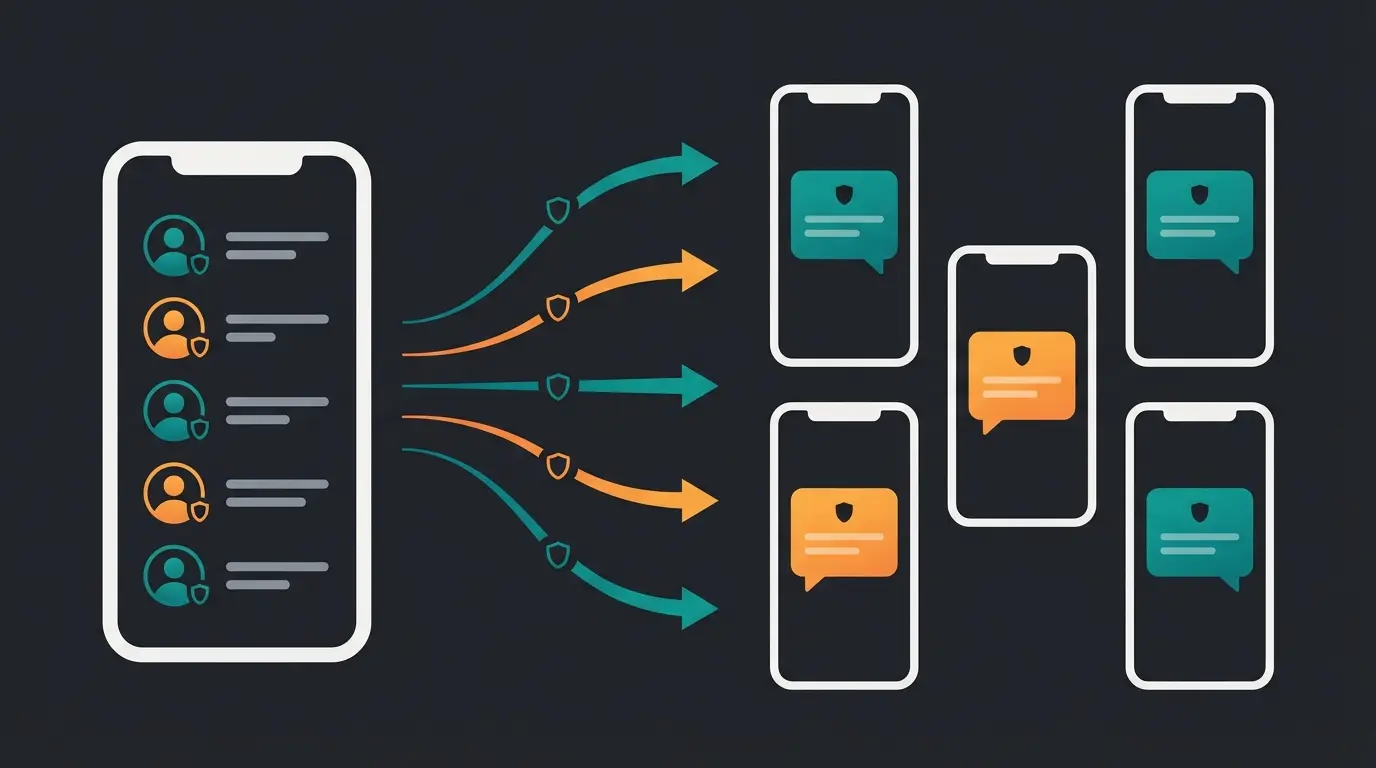
When you create a broadcast list and send a message, it initially looks almost like a WhatsApp group from your end.
- The List View: You see a list with the name (e.g., 'VIP Customers') where all recipients are collected.
- The Message: The sent message appears in this list chat.
- The Megaphone Icon: In your chat overview and next to the message, you'll often see a small megaphone symbol. This is your indicator that it's a mass message.
- The Individual Chat: As soon as you've sent the message, it additionally appears in every single private chat history you have with the recipients.
2. The Recipient's Perspective (The Customer)
Here lies the genius (and tricky part) of this function.
- Private Message: The recipient sees a completely normal, private message from you. There is no indication that 99 other people received the same text.
- No List: The recipient does not see who else is on the list. They don't even know they're on a list.
- The Megaphone Icon (Limited): In older versions or depending on the operating system (iOS/Android), a tiny megaphone symbol may appear next to the message time. However, most users overlook this or don't know what it means.
- The Feeling: For the recipient, it feels like a personal 1:1 conversation. This dramatically increases open rates compared to email newsletters.
3. The Perspective of 'Others' (Co-Recipients)
This is the most important point for privacy and etiquette:
- Complete Blindness: Recipient A never sees Recipient B.
- No 'Reply-All' Danger: If Recipient A replies ('Great offer, I'll take it!'), this response lands only with you (the sender). Recipient B knows nothing about it.
In summary: WhatsApp Broadcast is technically the exact equivalent of BCC (Blind Carbon Copy) in email.
WhatsApp Broadcast vs. Group: The Key Difference
Many users confuse the terms or are unsure which tool is suitable for which purpose. If you're still unclear on what is whatsapp broadcast, understanding the difference is essential when you want to master this distinction effectively.
Here's the direct comparison:
| Feature | WhatsApp Group | WhatsApp Broadcast (Manual) | Professional API Solution (AI) |
|---|---|---|---|
| Visibility | Everyone sees everyone (names & numbers are public!) | Anonymous (recipients only see the sender) | Anonymous (highest data protection) |
| Communication | Many-to-Many (discussion) | One-to-Many (announcement) | One-to-Many + AI Dialog |
| Replies | All group members read the reply | Reply lands in private 1:1 chat with sender | Reply is analyzed by AI & processed immediately |
| Requirement | Invitation / Link | Recipient must have your number saved | No saving needed (opt-in is enough) |
| Limit | 1,024 participants | 256 contacts per list | Unlimited (scalable) |
| Privacy (GDPR) | Disaster for business (data leak) | Critical (phone book access required) | 100% GDPR compliant |
| Main Purpose | Community, discussion, clubs | Info distributor, newsletter | Sales, support & consultation |
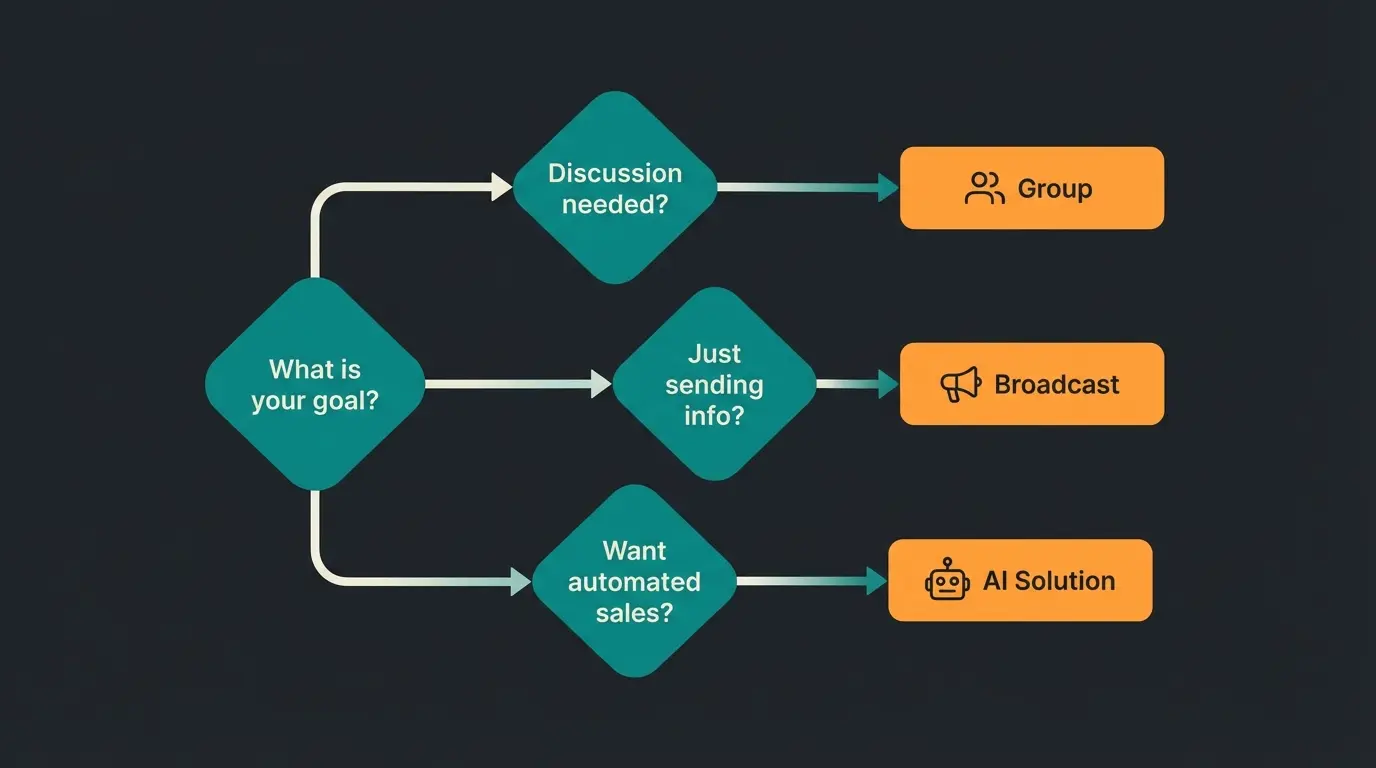
When Should You Use Which?
- Use a group when you want participants to discuss with each other (e.g., 'Christmas party planning', 'Sports club').
- Use broadcast when you want to distribute information without triggering a discussion that annoys everyone (e.g., 'New opening hours', 'Offer of the week').
Step-by-Step: Creating & Managing Broadcast Lists
Want to manage a broadcast list or create a new one? The process is slightly different on Android and iOS, but simple.
For Android Users:
- Open WhatsApp and go to the 'Chats' tab.
- Tap the three dots (menu) in the top right corner.
- Select 'New Broadcast'.
- Select the contacts (minimum 2, maximum 256).
- Tap the green checkmark. Done.
For iPhone (iOS) Users:
- Open WhatsApp and go to 'Chats'.
- Tap 'Broadcast Lists' in the top left.
- Tap 'New List' at the bottom.
- Select the contacts.
- Tap 'Create'.
Editing Lists (Rename, Delete Contacts):
To manage an existing list, open the broadcast list like a chat. Tap the list name at the top (or 'Broadcast List'). Here you can:
- Give it a name (e.g., 'Regular Customers').
- Add or remove recipients.
- Delete the list completely.
The Privacy Trap: Broadcast & GDPR Compliance
Now let's address the uncomfortable part that many 'How-To' guides ignore. If you're a private individual sending birthday greetings, everything is fine. But as soon as you act as a business, you're entering a minefield when it comes to WhatsApp broadcast data protection.
Why the Regular WhatsApp App Is Off-Limits for Businesses:
Your entire phone book is shared with Meta servers in the USA
No way to legally prove opt-in for marketing messages
Maximum recipients per broadcast list in regular app
Potential penalty for serious data protection violations
- The Address Book Problem: To use WhatsApp, you grant the app access to your entire phone book. Your contacts' data (including those who don't use WhatsApp) is transferred to servers in the USA (Meta). Under GDPR, this is illegal without explicit consent from each individual contact.
- Missing Documentation: For marketing messages, you need explicit 'opt-in' (consent) from the customer. In the regular app, this opt-in can hardly be legally documented and archived.
- The 'Right to Be Forgotten': When a customer demands deletion of their data, you must ensure they actually disappear from all lists and backups. In the manual app, this is error-prone.
- Mixing Private & Business: On a normal phone, private chats often mix with business broadcasts. A nightmare for any data protection officer.
The consequence: Consumer protection associations and data protection authorities are increasingly scrutinizing messenger marketing. Those who save money here often pay dearly later.
The 'Reply Problem': What Happens When 200 Customers Respond?
Let's assume you ignore the privacy risks or have somehow solved them. You now send a broadcast to 256 customers with the text: 'Our new summer catalog is here! Check it out.'
What happens now?
Since WhatsApp is a conversation channel (unlike email), people reply. They don't just write 'Thanks,' but ask questions:
- 'Do you have this in size 42?'
- 'Does the discount apply to reduced items too?'
- 'What time are you open tomorrow?'
- 'My last package hasn't arrived yet.'
The Reality of Manual Broadcasts:
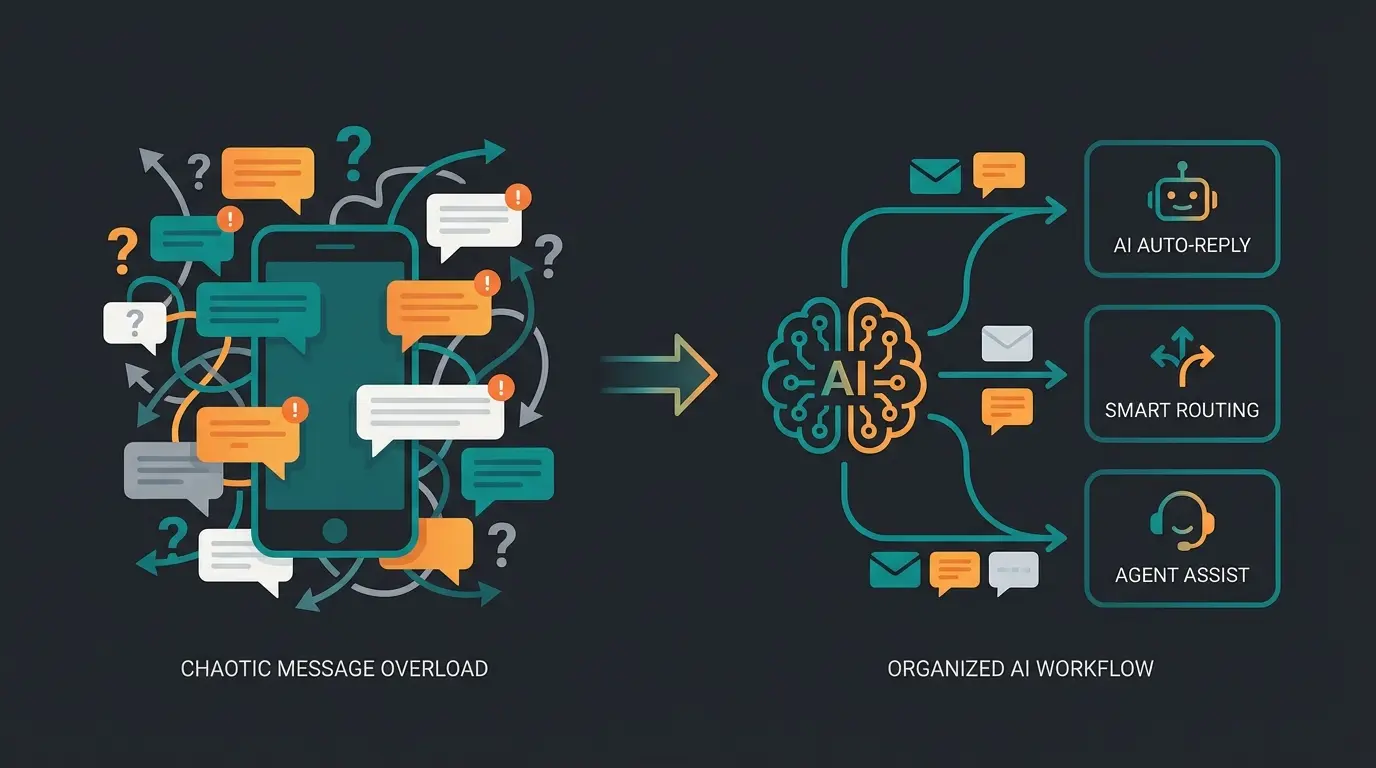
Suddenly your phone lights up 50 times. You have 50 private chats open.
- You have to open each chat individually.
- You need to restore context ('What is this customer responding to?').
- You manually type a response 50 times.
- While you're typing, new messages come in.
- The result: Overwhelm, long wait times for the customer, and missed sales opportunities.
Most businesses use broadcasts like a newsletter (one-way street). But customers use WhatsApp like a chat (dialogue). This is where a gap opens up.
Stop drowning in manual replies. Let AI handle customer questions instantly while you focus on growing your business.
Start Free TrialThe Solution: Scalable Product Consultation Instead of Silent Newsletters
The answer to 'Who sees what?' is important. But the more crucial question for your business success is: 'Who responds to whom?'
This is where modern WhatsApp Business API solutions with AI integration come into play. They bridge the gap between mass messaging and individual consultation.
How Does It Work?
Instead of using the regular WhatsApp app, you use software connected to the official WhatsApp Business API.
Broadcast to 1,000 or 10,000 recipients simultaneously with documented opt-in
All replies land in one organized dashboard, not scattered across a phone
The AI understands customer intent, checks inventory, and retrieves order status
Customers get answers in seconds, not hours—24/7 availability
Complex cases are routed to your team with full context
1. The Send (Scalable & Secure): You send a message to 1,000 or 10,000 recipients simultaneously.
- Advantage: GDPR-compliant, no 256 contact limit, customers don't need to have your number saved.
2. The Response (Automated & Intelligent): When 200 customers now reply, it doesn't land on a phone but in a central inbox. But before a human needs to intervene, the AI takes over.
Consider these real scenarios that a WhatsApp AI bot handles:
- Customer A asks: 'Do you have this in red?'
- AI checks: Inventory in the online shop.
- AI responds: 'Yes, we still have 5 in red in stock. Here's the link to the product.'
- Customer B asks: 'Where's my order?'
- AI checks: Shipping status in the logistics system.
- AI responds: 'Your package is expected to arrive tomorrow.'
Why This Revolutionizes Broadcasting
You transform a 'dumb' info distributor into hundreds of parallel sales conversations. This is what proactive Guided Selling looks like in practice:
- Instant Response: The customer waits 2 seconds, not 2 hours.
- Relief: Your team only needs to handle complex cases where the AI doesn't know what to do.
- Conversion: A customer who immediately gets an answer to their purchase question is much more likely to buy.
Modern AI product consultants don't just answer questions—they actively guide customers toward the right products based on their needs. This is the difference between passive support and active sales assistance.
Real-World Success: AI Consultation in Action
The shift from manual broadcasts to AI-powered consultation isn't theoretical. Companies across industries are already seeing remarkable results with AI-powered product consultation.
Take Gartenfreunde, for example. Their AI Employee 'Kira' handles thousands of customer inquiries about gardening products, providing instant expert advice that would be impossible to scale manually. Similarly, Rasendoktor implemented AI Product Consultation to help customers find the right lawn care solutions—turning what would be overwhelming reply chaos into organized, profitable conversations.
For e-commerce businesses, the integration with platforms like Shopware makes this even more powerful. Shopware 6 chatbots can pull real-time inventory data, understand product specifications, and provide personalized recommendations that convert browsers into buyers.
The Evolution: From Groups to AI-Powered Consultation
Understanding the historical progression helps clarify why AI solutions have become essential for businesses serious about WhatsApp marketing.
| Era | Method | Pros | Cons |
|---|---|---|---|
| Past | WhatsApp Groups | Easy to set up, familiar | Privacy disaster, chaotic, unprofessional |
| Present | Manual Broadcast Lists | Recipients stay private, simple workflow | 256 limit, GDPR risks, reply chaos |
| Future | API + AI Automation | Unlimited scale, compliant, instant responses | Requires initial setup investment |
The key insight is that broadcasts start conversations, but humans can't finish them at scale. Your AI doesn't just send the message (like a newsletter tool); it handles the consultation that follows.
This is particularly important given that WhatsApp is aggressively blocking business numbers that use normal broadcasts for marketing in 2024/2025. What was once 'optional' has become essential for any serious business communication strategy.
Implementing AI Broadcast Solutions: Getting Started
If you're convinced that upgrading from manual broadcasts makes sense, the implementation path is straightforward. Modern AI sales consultant platforms handle most of the technical complexity.
Key Requirements:
- WhatsApp Business API Access: This official channel removes the 256-contact limit and phone book requirement.
- Message Template Approval: WhatsApp pre-approves your broadcast templates to prevent spam.
- AI Training: Your product catalog and FAQs train the AI to answer customer-specific questions.
- CRM Integration: Connect to your existing systems for order status, inventory, and customer data.
The beauty of AI product consultation is that it combines the reach of broadcast messaging with the personalization of 1:1 conversation. For KI E-Commerce applications in particular, this combination drives measurable revenue increases.
Conclusion: Using Broadcasts Professionally
The question 'WhatsApp broadcast list: who sees what?' can be answered simply: It's a discreet way to send messages where recipients' privacy from each other is protected.
But for businesses, that's just the tip of the iceberg. Anyone still manually maintaining broadcast lists via their personal phone in 2025 risks not only warnings for data protection violations but also leaves massive revenue potential on the table.
The evolution of WhatsApp marketing looks like this:
- Past: WhatsApp groups (chaos & privacy nightmare).
- Present: Manual broadcast lists (tedious, limited, legally gray).
- Future: API solutions with AI automation (scalable, secure, revenue-generating).
If you're ready to professionalize your customer communication, you should take the step from manual lists to intelligent platforms. Your customers—and your thumbs from all that typing—will thank you.
FAQ: Common Questions About WhatsApp Broadcast Lists
Generally no. The message looks like a normal private message. Only in rare cases (older versions) is there a small icon. The recipient definitely does not see who else received the message.
In the regular WhatsApp app and Business app, the limit is 256 contacts per list. However, you can create multiple lists. Through the WhatsApp Business API, the number of recipients is theoretically unlimited.
The most common problem is that the recipient hasn't saved your phone number in their address book. This is a security measure from WhatsApp against spam. Via the API, this restriction doesn't apply (though there are costs per conversation).
Yes, but only individually. You need to open each individual chat and check the message info (blue checkmarks) to see if that specific person has read the message. There's no overall statistic ('50% open rate') in the regular app.
Using the regular WhatsApp app for business marketing is highly problematic under GDPR. The phone book synchronization, lack of documented opt-in, and data transfer to US servers create significant legal risks. The official WhatsApp Business API with proper consent management is the compliant alternative.
Transform your broadcasts into intelligent sales conversations. Get GDPR-compliant messaging with AI-powered product consultation that converts.
Get Started Now
Lasse is CEO and co-founder of Qualimero. After completing his MBA at WHU and scaling a company to seven-figure revenue, he founded Qualimero to build AI-powered digital employees for e-commerce. His focus: helping businesses measurably improve customer interaction through intelligent automation.