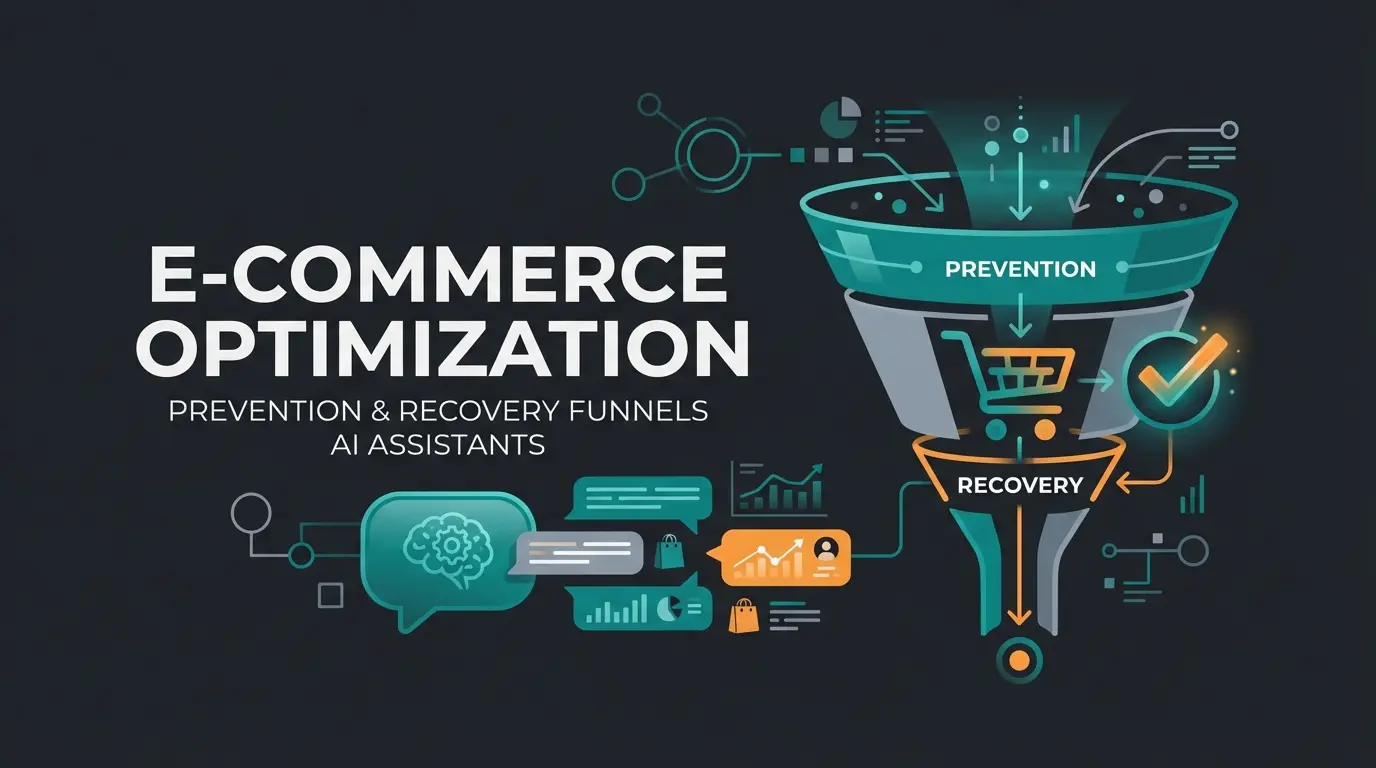
Why 70% of Your Visitors Fill Carts But Never Pay
Have you ever wondered why 70% of your visitors fill their shopping cart but never complete the purchase? It's the most frustrating scenario in e-commerce: You've invested money in SEO and ads, the customer is in your shop, the product is in the cart—and then: silence. The purchase is abandoned. If you're like most Shopware operators, you blame the technology. Is the server too slow? Are there too many clicks? Do I need a one-page checkout plugin?
The answer is: Yes, but that's only half the truth. In this comprehensive guide to Shopware checkout optimization, we go beyond the standard tips. For more details, see our more conversion rate tips. We not only cover the technical must-haves in Shopware 6, but we also address the true conversion killer: Decision Fatigue. Learn how to transform your checkout from a mere transaction machine into an intelligent sales consultant—powered by cutting-edge AI product consultation technology.
The Hard Numbers: Why You Must Take Action Now
Before we dive into solutions, let's examine the status quo. Current data from 2024 and projections for 2025 paint a clear picture that demands immediate attention from every Shopware store owner.
According to Baymard Institute, this is the average rate of filled carts left behind
Smartphones show an alarming abandonment rate as reported by Adoric research
Unexpected shipping, taxes, and fees cause nearly half of all abandonments
Mandatory registration remains a major barrier to purchase completion
However, one number is often overlooked in statistics: The number of abandonments due to uncertainty. Studies from Winsome Marketing show that users confronted with more than 12 decision points abandon significantly more frequently. This is where your greatest leverage lies.
Part 1: The Basics—Eliminating Technical Hurdles
Before we tackle the psychological barriers, we must ensure your Shopware store runs technically flawlessly. A stumble-free path to the checkout is the foundation of every optimization. Think of it as clearing the road before you can drive the car.
Guest Checkout & Account Requirements: Removing Barrier #1
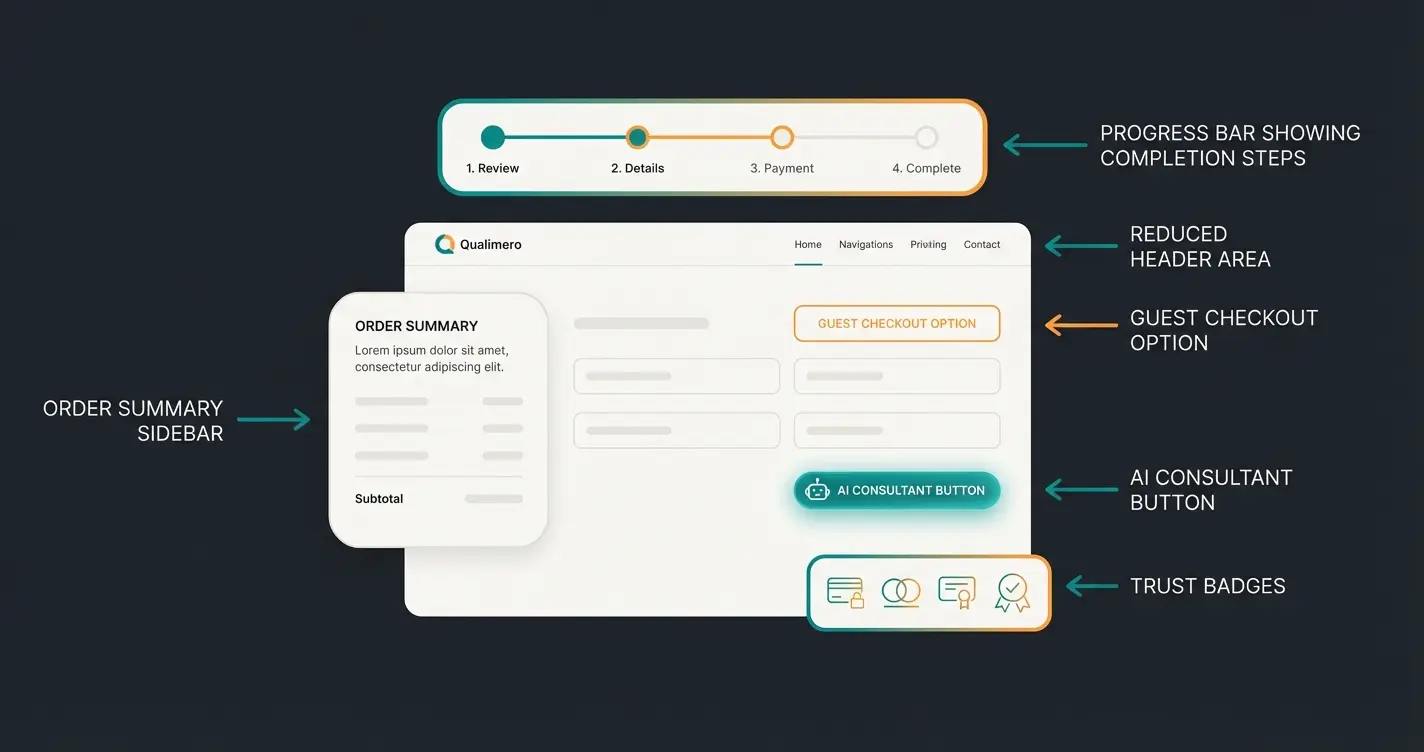
Nothing kills conversion faster than a forced "create account" requirement when the customer is in a hurry. In Shopware 6, configuring guest checkout is essential for maximizing conversions and reducing friction at the most critical moment of the purchase journey.
How to configure it in Shopware 6: Many store operators search in vain for a simple "enable guest checkout" switch. In Shopware 6, the logic is reversed, as explained in the EXWE documentation:
- Navigate in the admin area to Settings > Shop > Login / Registration
- Look for the option "Disable no customer account"
- Make sure this option is set to "No"
Activate Tunnel Checkout: Eliminate All Distractions
In checkout, tunnel vision is good. As soon as the customer presses the "Go to checkout" button, all elements that could distract them from completing the purchase should disappear (e.g., main navigation, category pages, footer links). This approach is fundamental to Shopware support automation strategies.
- Implementation in Shopware 6: By default, Shopware 6 already offers a reduced header in checkout
- Optimization: Check your theme. Many premium themes offer a "Simple Header" option for checkout. If not, you can control this via Shopping Experiences layouts or small CSS adjustments in the theme
- Goal: The only path leads forward (complete purchase) or back (edit cart)
Payment Methods & Shipping: The German Special Path
The German market works differently. While credit cards dominate internationally, the reality in the DACH region looks quite different according to the EHI Retail Institute 2024:
- PayPal: Undisputed leader with approximately 27.7% market share
- Purchase on Invoice: Extremely popular at 26.7% and a massive trust factor
- Direct Debit & Installment Payments: Installment payment is gaining importance, especially for higher cart values
Action Recommendation: Offer PayPal Express directly in the cart or off-canvas menu. This skips the address entry in the shop since the data is pulled from PayPal. This drastically reduces the clicks to purchase and is a proven technique in AI e-commerce consultation strategies.
Mobile First: Thumb-Friendly Design Principles
Since over 70% of traffic occurs on mobile devices, but conversion there is the worst, your Shopware checkout must be "thumb-friendly." This is where technical optimization meets user experience design.
- Sticky Buttons: The "Buy now" button should always stay in the visible area (viewport) on smartphones
- Forms: Use Shopware's standard autocomplete functions to minimize typing
- Keyboard Layout: Ensure that the number keypad automatically opens on the smartphone for phone number fields
Part 2: The Psychology of Abandonment
Most agencies will tell you: "Your checkout is too slow" or "You need fewer form fields." That's technically correct, but it ignores human psychology. Understanding why customers really leave is the key to conversational AI business transformation.
Uncertainty Beats Laziness Every Time
A customer rarely abandons a purchase because they're too lazy to type their address (that's what autofill is for). They abandon because they have doubts. This phenomenon is called Decision Fatigue. Research from RevLifter shows that the human brain has only a limited capacity for decisions. When a customer has clicked through hundreds of variants, they're mentally exhausted by the time they reach checkout.
The "Last Mile" of Decision Making
The checkout is the most dangerous place for emerging doubts to arise. These common questions plague customers at the worst possible moment:
- "Does this replacement part really fit my model?"
- "What was the return period again if I don't like it?"
- "Do I still need the accessory cable?"
In a standard Shopware shop, the customer now has two options: They leave the checkout to search for information in the shop (and often don't come back), or they abandon the purchase completely. This is where classic "conversion optimization" fails. We've smoothed the road (technical optimization), but we haven't helped the driver find the destination (psychological optimization). This gap is precisely what AI-powered chatbot solutions are designed to address.
Part 3: Checkout Optimization 2.0—Consultation Over Processing
Here's where your competitive advantage comes into play: The integration of AI-powered consultation directly in the checkout. We need to stop seeing the checkout only as a cash register. It's the last and most important sales space in your entire customer journey.
The "Silent" Abandoner: Identifying Hidden Losses
Analyze your data carefully. Many customers linger on the checkout page, move the mouse, scroll up and down—and then leave. That's not a technical problem. That's an information deficit. These are the customers you can save with the right approach to AI personalization in customer service.
AI as Sales Consultant in the Checkout Experience
Imagine if at the supermarket checkout there was still an expert who whispered to you: "Yes, this wine goes excellently with the fish you also have in your cart." That's exactly what modern AI accomplishes in the Shopware checkout. Instead of putting off the customer with static FAQs ("We ship with DHL"), an integrated AI solution can address context-specific doubts. This represents the cutting edge of Shopware AI product consultation.
Example Scenario: A customer is buying an expensive coffee machine but hesitates at the "Buy" button.
- Standard Shop: Shows only the price. Customer doubts remain unaddressed.
- Optimized Shop: A subtle chat window or tooltip (triggered by dwell time) asks: "Unsure about descaling? This model has an automatic cleaning program. Should I quickly add the matching care set for you?"
FAQ Bots vs. Real Product Consultation
It's important to distinguish here between different types of automated assistance. The difference between a basic chatbot and a true Shopware chatbot AI solution is significant:
- Dumb Chatbots: Respond to keywords. Customer: "Does this fit?" Bot: "Here are our shipping costs." -> Frustration and abandonment.
- AI Consultants: Understand the cart context. Customer: "Does this fit?" AI: "Since you have model X in your cart, this accessory fits perfectly." -> Trust and confidence built.
| Feature | Passive Optimization (Standard) | Active Optimization (AI-Driven) |
|---|---|---|
| Focus | Speed | Confidence |
| Main Goal | Reduce Friction | Eliminate Doubt |
| Tool | One-Page Checkout Plugin | AI Product Consultant |
| Metric | Conversion Rate | Decision Confidence Score |
| Customer Feeling | "That was fast." | "I bought the right thing." |
| Effect | Prevents Frustration | Prevents Buyer's Remorse |
Stop losing sales to customer uncertainty. Our AI product consultant answers questions in real-time, building confidence and boosting conversions by up to 35%.
Start Free Trial TodayPart 4: Step-by-Step AI Integration in Shopware
How do you implement this concretely in Shopware 6? Here's your roadmap to combine technical excellence with psychological intelligence for maximum conversion impact.
Step 1: Choosing the Right Location (Off-Canvas vs. Checkout)
The best place to catch doubts is often already the Off-Canvas Cart (the menu that slides in from the side). This early intervention point aligns with best practices in Shopware customer service optimization.
- Shopware Setting: Check under Settings > Cart whether the off-canvas cart is active
- Strategy: Integrate your "AI Consultant Trigger" here. When the customer opens the cart to check prices, the AI can already do upselling or answer questions before they even reach checkout
Step 2: Using "Dynamic Access" (from Evolve Plan)
If you use the Shopware "Evolve" plan, the Dynamic Access feature is available to you according to the official Shopware documentation. This powerful feature enables personalized checkout experiences.
What it does: You can define rules (via the Shopware Rule Builder) to determine who sees which content.
Application Examples: Show special trust elements or consultation offers only for customers who:
- Have a cart value over €100
- Have been in checkout for more than 2 minutes
- Come from a specific region or customer segment
Step 3: Using Shopping Experiences in Checkout
Shopware 6 allows you to edit the checkout pages via Shopping Experiences (CMS). This gives you powerful customization options that go far beyond basic settings.
- Create a sidebar section for the checkout area
- Place not only the trust badge there, but "micro-copy" that provides security (e.g., "30-day trial" instead of just "Return policy")
- Integrate the script for your AI assistant here so it's unobtrusively available on the side
Step 4: The "Zero-Click" Support Strategy
Don't hide your phone number, but offer a faster alternative. This approach is central to modern AI consulting for e-commerce success.
- Problem: Nobody wants to make a phone call during checkout (media break and friction)
- Solution: An AI chat that responds instantly. Position this directly next to the total amount
- Wording: Instead of "Help" use "Question about product in cart?". This is more specific and lowers the threshold for engagement
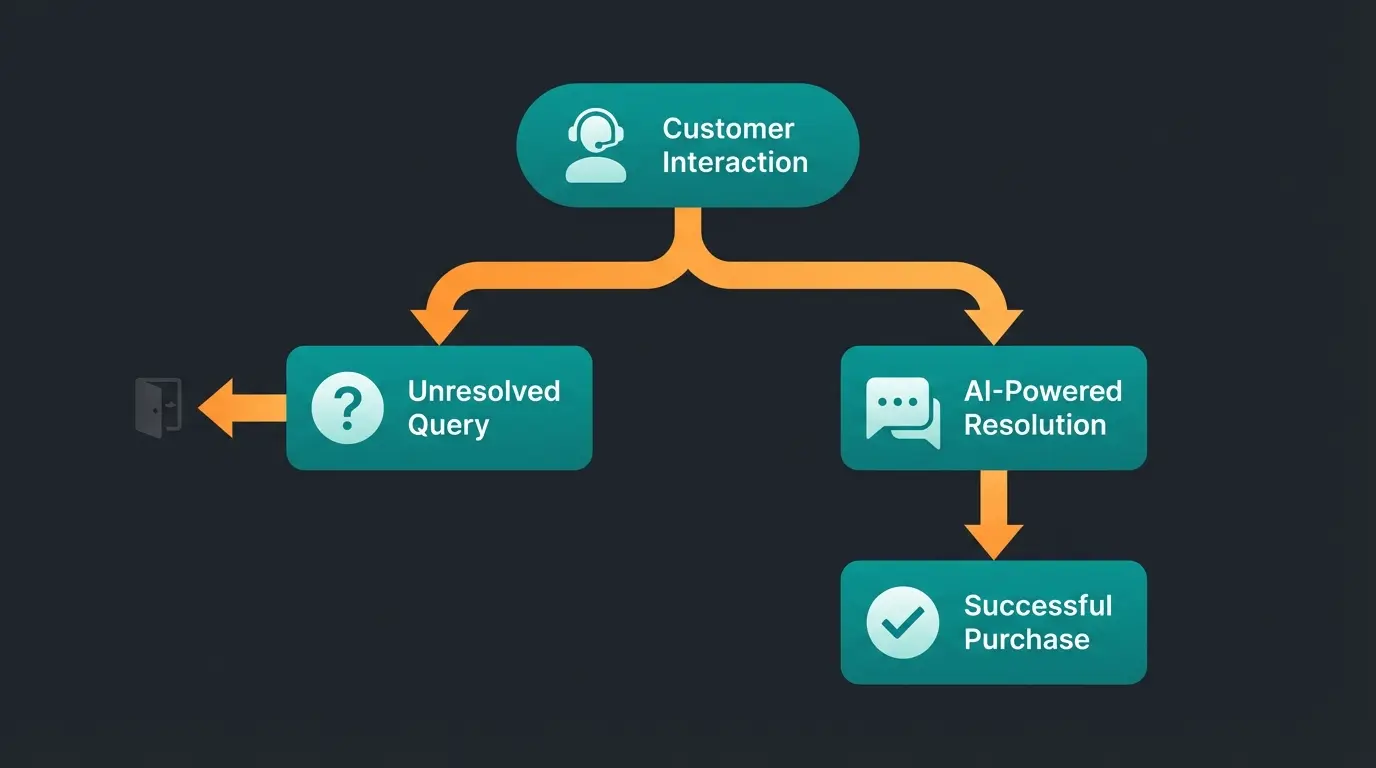
Customer has doubt: 'Does this part fit my model?'
Searches for info → Finds nothing → Leaves checkout → Searches Google → Purchase abandoned or bought from competitor
Clicks 'Question about product' → AI analyzes cart → AI confirms compatibility in < 2 seconds → Customer clicks 'Buy' with confidence
Part 5: Your Complete Action Checklist for More Revenue
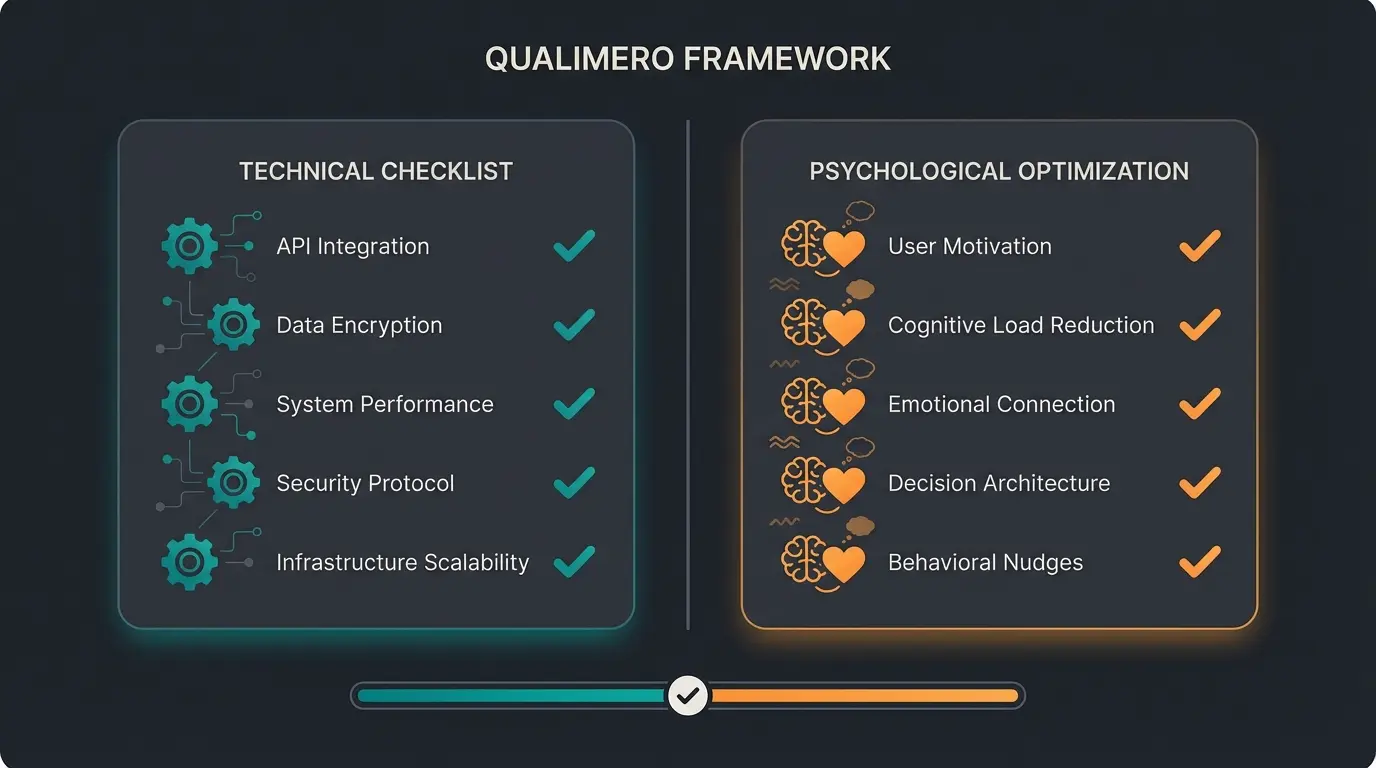
In summary: To truly optimize the Shopware checkout, you must unite technology and psychology. Work through this comprehensive list to ensure nothing is missed.
Technical Basics (The Required Foundation)
- Guest Checkout: Is "Disable no customer account" set to "No"?
- Payment Methods: Are PayPal Express and purchase on invoice (e.g., via Klarna/PayPal Plus) integrated?
- Tunnel Checkout: Are header and footer hidden in the order process?
- Speed: Do checkout steps load in under 1 second? (Check caching if not)
- Legal Compliance: Are terms and conditions checkboxes and cancellation policies correct but not intrusively placed?
Psychological Excellence: The Revenue Booster
- Reduce Decision Fatigue: Have you removed unnecessary selection fields?
- Build Trust: Are trust badges (Trusted Shops, TÜV) visible next to the "Buy" button?
- Shipping Cost Transparency: Are shipping costs already shown in the off-canvas cart (prevents shock at checkout)?
- AI Consultation Integrated: Is there a way for customers to clarify final product questions within the checkout without leaving the page?
Implementing these elements effectively requires understanding the broader context of KI sales automation and how it integrates with your existing Shopware infrastructure.
Conclusion: From Cash Register to Concierge Service
Optimizing a Shopware checkout used to mean simply removing hurdles. The goal was to push customers through as quickly as possible. But in 2025, that's no longer enough. Customers are more demanding, more skeptical, and overwhelmed by options from countless competitors.
The winner in e-commerce won't be the shop that processes customers fastest, but the one that gives them the greatest confidence. By combining technical excellence in Shopware 6 with intelligent, AI-powered consultation—as demonstrated in our Rasendoktor success story—you transform your checkout from a mere cash register into a first-class concierge service.
Start today: Check your guest checkout settings and consider where on the "last mile" your customers might still have questions. That's exactly where your hidden revenue lies waiting to be captured.
Frequently Asked Questions About Shopware Checkout
Navigate to Settings > Shop > Login / Registration in your Shopware 6 admin panel. Find the option "Disable no customer account" and set it to "No". Choose "No: Option is not preselected" to allow guest checkout while subtly encouraging account creation, or "No: Option is preselected" for maximum speed optimization.
According to EHI Retail Institute data from 2024, PayPal leads with 27.7% market share, followed closely by purchase on invoice at 26.7%. Installment payments are gaining importance for higher cart values. Offering PayPal Express directly in the cart can significantly reduce clicks to purchase.
While 48% abandon due to unexpected costs and 26% due to forced account creation, a significant portion leaves because of psychological uncertainty—doubts about product fit, compatibility, or return policies. This "decision fatigue" is often overlooked but represents your greatest optimization opportunity.
AI consultation addresses the psychological barriers that cause abandonment. Instead of static FAQs, AI understands cart context and can answer specific questions like product compatibility or return policies in real-time. This builds purchase confidence and can reduce cart abandonment by addressing doubts before customers leave.
Checkout steps should load in under 1 second. If your checkout is slower, review your caching settings, server performance, and consider optimizing images and scripts. Slow loading times significantly increase abandonment rates, especially on mobile devices where 85% of carts are abandoned.
Join hundreds of Shopware merchants who've reduced cart abandonment by implementing AI-powered consultation. Get started with a free trial and see the difference confidence-building makes.
Start Your Free Trial
Lasse is CEO and co-founder of Qualimero. After completing his MBA at WHU and scaling a company to seven-figure revenue, he founded Qualimero to build AI-powered digital employees for e-commerce. His focus: helping businesses measurably improve customer interaction through intelligent automation.